
Top 5 Analytics Tools for Digital Marketing in 2026 (Complete Guide for Beginners & Professionals)

Introduction
Most businesses running SEO, Google Ads, social media, and email campaigns still can't answer one basic question: which activity is actually bringing in leads and sales? Money goes out every month, reports get skimmed, and decisions get made on gut feeling instead of data. That's the gap analytics tools exist to close.This guide covers the digital marketing analytics tools worth knowing in 2026, what each does, who it suits, and how professionals combine them, so you finish knowing exactly which tool to start with.
Quick Answer
No single tool covers everything, so the "best" analytics tool depends on your goal. For most businesses,Google Analytics 4 is the foundation free, tracking traffic, engagement, and conversions across site and app. Pair it with Google Search Console for SEO visibility and Microsoft Clarity for free heatmaps and session recordings. Once you need deeper competitor research, SEMrush earns its price tag. Looker Studio turns raw data into readable dashboards, and agencies juggling clients usually add HubSpot for CRM-linked reporting. Start small, expand as decisions get complex.Why Digital Marketing Analytics Matters More Than Ever
Marketing has gotten more expensive and more competitive at once. Dentsu's 2026 global ad forecast puts total advertising spend past $1 trillion this year, with digital channels making up roughly 69%, meaning more brands bidding for the same keywords.Privacy changes have made third-party tracking less reliable, pushing marketers toward first-party and server-side data. AI is reshaping search too: recent data shows AI Overviews now appear on close to half of all Google searches. Guessing which campaigns work is expensive; analytics is how you stop guessing.
What Is a Digital Marketing Analytics Tool?
A digital marketing analytics tool collects data about how people find, visit, and interact with your business online, then turns that into reports you can act on. Analytics isn't reporting; reporting shows what happened, analytics asks why. And measuring traffic isn't measuring growth: a page can get thousands of visits and still generate zero revenue.Types of Digital Marketing Analytics Tools
Before installing anything, know what each category solves:-
Website analytics – traffic, behaviour, conversions (GA4, Matomo)
-
SEO analytics – rankings, backlinks, visibility (Search Console, SEMrush, Ahrefs)
-
User behaviour analytics – clicks, scrolls, drop-offs (Clarity, Hotjar)
-
Marketing attribution – which channel deserves credit for a sale
-
Product analytics – in-app or in-product actions (Mixpanel, Amplitude)
-
Dashboard reporting – combines sources into one view (Looker Studio)
-
Social media analytics – engagement and reach per platform
-
Email analytics – opens, clicks, list performance
The M.E.A.S.U.R.E Framework
A simple framework for how analytics actually creates results:-
M — Measure. Collect data tied to real outcomes, not just visits.
-
E — Evaluate. Spot trends: which pages or campaigns are gaining or losing ground.
-
A — Analyse. Understand why users behave that way, using heatmaps and recordings.
-
S — Solve. Fix the specific problem: a slow page, a confusing form, weak copy.
-
U — Upgrade. Apply the lesson to the next campaign.
-
R — Report. Build dashboards stakeholders can read in under a minute.
-
E — Expand. Put more budget behind what's proven to work.
How We Evaluated These Analytics Tools
Every tool below was judged on ease of use, features, reporting quality, integrations, learning curve, pricing, AI capabilities, scalability, support, and value for money, not feature count alone.Best Digital Marketing Analytics Tools
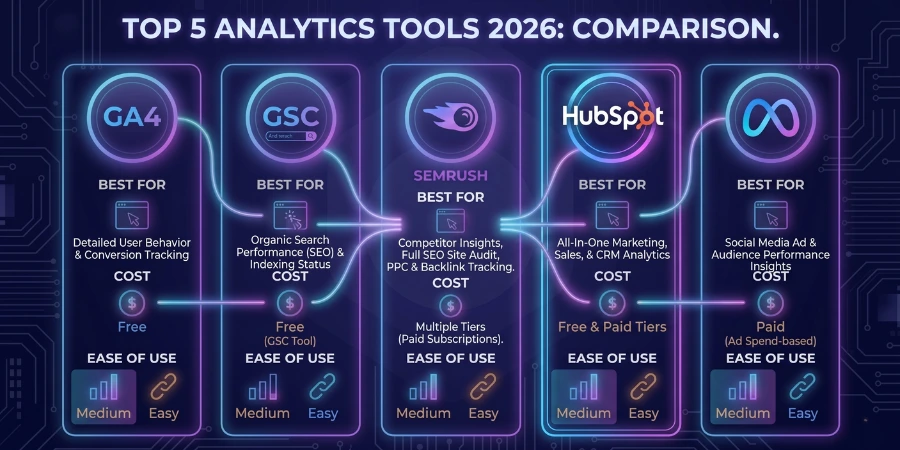
Google Analytics 4 (GA4)
Best for: free, all-round website and app analytics.Features: event tracking, real-time data, audience segments, Ads integration.
Trade-off: free and deeply integrated, but has a real learning curve.
Pricing: free; GA4 360 for enterprise.
Example: an online store learns which campaign drives checkouts, not just clicks.
Verdict: the non-negotiable starting point for every website; skip only for deep product analytics (try Mixpanel).
Beginner 3/5 ·
Expert 5/5.
Google Search Console
Best for: understanding how Google sees your site.Features: search queries, indexing status, click data, Core Web Vitals.
Trade-off: free and direct from Google; no behaviour data, organic-only.
Pricing: free.
Example: a blogger spots a keyword driving impressions but no clicks, then rewrites the title.
Verdict: the most underused free tool in marketing; every site should connect it.
Beginner 4/5 ·
Expert 5/5.
Microsoft Clarity
Best for: free heatmaps and session recordings.Features: heatmaps, session replay, rage-click detection, AI summaries.
Trade-off: completely free and easy to install; lighter on segmentation than paid rivals.
Pricing: free.
Example: a dentist's site shows visitors abandoning the appointment form at the phone-number field.
Verdict: one of the best free additions to any stack.
Beginner 5/5 ·
Expert 4/5.
SEMrush
Best for: SEO and competitor research at scale.Features: keyword research, site audits, rank tracking, PPC and content tools.
Trade-off: one platform for SEO, PPC, and content; pricier, with a real learning curve.
Pricing: from ~$130/month.
Example: an agency finds a competitor's ranking gap and builds content to fill it.
Verdict: worth it once SEO drives real revenue; skip pre-launch.
Beginner 3/5 ·
Expert 5/5.
Ahrefs
Best for: backlink analysis and technical SEO depth.Features: backlink index, keyword explorer, site audit, content gaps.
Trade-off: one of the largest backlink databases; similar cost to SEMrush, with overlap.
Pricing: from ~$129/month.
Example: a SaaS company identifies which backlinks actually move rankings.
Verdict: the sharper tool for link-focused SEO work.
Beginner 3/5 ·
Expert 5/5.
Looker Studio
Best for: turning scattered data into one clean dashboard.Features: free connectors to GA4, Search Console, Ads, Sheets.
Trade-off: free and visual; needs setup time and isn't an analytics engine itself.
Pricing: free.
Example: an agency builds one client-facing dashboard instead of five separate exports.
Verdict: the tool that makes every other tool easier to explain.
Beginner 4/5 ·
Expert 5/5.
HubSpot Analytics
Best for: connecting marketing data to CRM and sales.Features: contact tracking, campaign reporting, revenue attribution, lead scoring.
Trade-off: ties marketing to closed deals; gets pricey as contacts grow.
Pricing: free tier; scales with contacts.
Example: a real estate firm tracks which channel brings leads that actually close.
Verdict: strong once lead quality matters more than lead count.
Beginner 3/5 ·
Expert 4/5.
Hotjar
Best for: deeper behaviour analysis than free tools offer.Features: heatmaps, recordings, surveys, feedback widgets.
Trade-off: strong surveys alongside behaviour data; real volume needs a paid tier.
Pricing: free tier; paid from ~$32/month.
Example: a gym adds an exit survey and learns pricing confusion is stopping sign-ups.
Verdict: a solid step up once Clarity's limits show.
Beginner 4/5 ·
Expert 4/5.
Mixpanel
Best for: tracking user actions inside a product or app.Features: event tracking, funnels, cohorts, retention reports.
Trade-off: built for product behaviour, not marketing traffic; overkill for a simple website.
Pricing: free tier; scales with users.
Example: a SaaS team sees exactly where new users drop off during onboarding.
Verdict: essential for product teams, unnecessary for most small businesses.
Beginner 2/5 ·
Expert 5/5.
Matomo
Best for: privacy-focused, self-hosted website analytics.Features: full data ownership, GDPR-friendly setup, heatmaps, funnels.
Pricing: free self-hosted; cloud from ~$19/month.
Example: a school district needs full data control and picks Matomo over GA4.
Verdict: the go-to Google Analytics alternative for privacy-first teams.
Beginner 3/5 ·
Expert 4/5.
Adobe Analytics
Best for: large enterprises with complex, cross-channel reporting.Features: advanced segmentation, predictive analytics, real-time cross-device reporting.
Trade-off: handles massive volume; expensive and needs a trained analyst.
Pricing: custom enterprise pricing.
Example: a national retailer merges in-store and online data into one attribution model.
Verdict: built for scale most businesses will never reach.
Beginner 1/5 ·
Expert 5/5.
Amplitude
Best for: product analytics with strong predictive features.Features: behavioural cohorts, journey mapping, experimentation, AI insights.
Trade-off: excellent at predicting retention; similar cost and curve to Mixpanel.
Pricing: free tier; scales with usage.
Example: an app team finds which onboarding action best predicts a paying customer.
Verdict: a strong Mixpanel alternative for growth-stage product teams.
Beginner 2/5 ·
Expert 5/5.
Best Analytics Tools by Marketing Goal
-
Website analytics — GA4 for the full picture; Matomo if privacy is a priority.
-
SEO performance — Search Console plus SEMrush or Ahrefs for rankings and backlinks.
-
Google Ads & PPC — GA4 conversion tracking with Looker Studio; HubSpot if leads feed a CRM.
-
Social media analytics — native platform insights, unified in Looker Studio.
-
Ecommerce analytics — GA4 ecommerce tracking with Clarity for cart abandonment.
-
Email marketing analytics — your ESP's reports paired with GA4 for post-click behaviour.
-
User behaviour analytics — Clarity for free depth, Hotjar for surveys and volume.
-
Conversion rate optimisation — Clarity or Hotjar for behaviour, GA4 for funnel data.
-
Dashboard reporting — Looker Studio; free and connects to almost everything here.
-
Marketing attribution — HubSpot for CRM-linked attribution; Adobe for enterprise models.
Best Analytics Tools by Business Type
-
Small businesses — GA4, Search Console, and Clarity cover most needs free.
-
Local businesses — add call tracking alongside GA4 for enquiry-based leads.
-
Ecommerce stores — GA4 ecommerce tracking plus Clarity for abandonment.
-
Marketing agencies — Looker Studio for client dashboards, SEMrush for audits.
-
Bloggers & creators — GA4 and Search Console for organic growth and top content.
-
SaaS companies — Mixpanel or Amplitude for usage, GA4 for acquisition.
-
Restaurants & cafés — GA4 with Clarity to see which campaigns drive bookings.
-
Healthcare & clinics — GA4 with privacy-mindful call tracking for appointments.
-
Schools & institutes — GA4 and Search Console to track admission enquiry sources.
-
Real estate — GA4 with HubSpot to qualify lead quality, not just volume.
-
Freelancers & consultants — GA4 and Search Console are usually enough at low volume.
Best Analytics Tools by Budget
-
Free stack: GA4 + Search Console + Clarity + Looker Studio is enough for most beginners.
-
Under $50/month: add a starter SEMrush or Ahrefs plan once targeting competitive keywords.
-
Under $100/month: add Hotjar or a starter HubSpot plan once behaviour and lead quality matter.
-
Enterprise stack: Adobe Analytics or Amplitude, once volume and reporting outgrow free tools.
How Professionals Build a Complete Analytics Stack
Professionals rarely rely on one platform, because no single tool answers every question. A typical workflow: Marketing Channels → GA4 → Search Console → Clarity → SEMrush → Looker Studio → Business Decisions.GA4 captures what happened on-site. Search Console explains how people found it. Clarity shows why users behaved that way. SEMrush adds competitive context. Looker Studio pulls it all into one dashboard; only then does data become a decision. In our experience, most reporting problems come from skipping the middle steps and jumping straight from raw data to a dashboard.
The Marketing Metrics That Actually Matter
-
Traffic — rising traffic without rising leads is a warning sign, not a win.
-
Users — track alongside traffic to see new versus repeat audiences.
-
Sessions — useful for engagement patterns, not revenue conclusions.
-
Engagement rate — share of sessions with real interaction, better than old bounce-rate metrics.
-
Average engagement time — how long people actually engage, not just stay on a tab.
-
Conversion rate — the most business-relevant traffic metric there is.
-
Click-through rate — a health check for ad and SEO copy.
-
Cost per acquisition — spend divided by conversions; decides if a channel earns its budget.
-
Return on ad spend — revenue per dollar spent; watch this over CPA for ecommerce.
-
Customer acquisition cost — full cost to win a customer, including team time.
-
Customer lifetime value — total revenue over time, which justifies a higher CAC.
-
Organic traffic — a slower but more durable growth lever than paid channels.
-
Keyword rankings — track the trend, not a single snapshot.
-
Lead quality — not all leads convert equally; track close rate by source.
-
Revenue — the metric every other metric should connect back to.
How AI Is Changing Marketing Analytics
AI is genuinely useful in analytics now, not just hype. Most platforms offer AI-generated insights that flag unusual trends, predictive analytics that forecast outcomes, and natural language reporting that lets you ask a dashboard a question instead of building a custom report.Automated anomaly detection is especially useful for catching tracking errors before they cost a week of decisions. That said, AI forecasting is only as reliable as the historical data feeding it a new business with three months of data gets shaky predictions regardless of the tool. Use AI to speed up analysis, not replace judgment about what the data means.
Common Analytics Mistakes Businesses Make
-
Installing GA4 without goals — define what a conversion means before launch.
-
Never setting up conversion tracking — pick one or two key actions and track them from day one.
-
Ignoring Search Console — check it weekly for query and indexing data GA4 can't show.
-
Tracking vanity metrics — tie every reported number back to leads or revenue.
-
Using too many tools at once — start with two or three, add only when a real gap appears.
-
Never reviewing reports — put a recurring review on the calendar, even monthly.
-
Ignoring heatmaps and recordings-- watch a handful of sessions every month.
-
Poor dashboard design — build around decisions, not every available metric.
-
Not checking attribution — review which channel earns credit before increasing its budget.
-
Not tracking revenue — connect ecommerce or CRM data, not just traffic.
-
Ignoring user behaviour data — pair numbers with recordings at least monthly.
-
Deciding on incomplete data — wait for a meaningful sample before changing strategy.
Best Practices for Better Marketing Analytics
-
Set clear business goals before choosing any tool.
-
Track conversions first, traffic second.
-
Review reports on a fixed schedule, not randomly.
-
Build dashboards around real decisions, not every metric.
-
Audit your analytics setup every quarter.
-
Compare performance against historical trends, not just last month.
-
Validate that tracking actually works before trusting the numbers.
-
Combine quantitative data with qualitative tools like heatmaps.
-
Use AI to assist analysis, not replace it.
-
Focus on business outcomes over vanity metrics.
30-Day Analytics Implementation Plan
Week 1: Install and correctly configure GA4. Connect Search Console. Set up conversion tracking for your top 1–2 actions.Week 2: Install Clarity or Hotjar. Watch session recordings. Identify your weakest pages.
Week 3: Connect Looker Studio. Build one dashboard covering traffic, SEO, and conversions. Review PPC performance if running ads.
Week 4: Fix the biggest issue found in Week 2. Measure the change. Set a recurring monthly reporting habit.
Future of Digital Marketing Analytics
Expect measurement to keep shifting toward first-party data and server-side tracking as third-party cookies lose reliability. Privacy-first analytics will become the default. AI-powered reporting and real-time dashboards will keep cutting manual report-building, while cross-channel attribution slowly improves. None of this replaces the fundamentals; clean tracking and clear goals will matter just as much in three years as today.Key Takeaways
-
No single analytics tool covers every need; most businesses need a small stack, not one platform.
-
Start with GA4, Search Console, and Clarity before spending on anything paid.
-
Conversion tracking matters more than traffic volume.
-
Heatmaps and recordings explain the "why" behind GA4's numbers.
-
Dashboards should be built around decisions, not every metric available.
-
Add paid tools only once a specific gap appears in your free stack.
-
Review analytics on a fixed schedule; data nobody reviews is wasted data.
Frequently Asked Questions
What is the best digital marketing analytics tool?
There isn't one. GA4 is the strongest start; add specialised tools as needs grow.Is Google Analytics 4 free?
Yes. GA4 360 is a paid tier for very high-traffic organisations.What is better than Google Analytics?
Nothing replaces it outright, but Matomo suits privacy-focused teams and Adobe suits enterprises.Can beginners use Google Analytics?
Yes, though the learning curve is real. Start with basic reports and conversions.Which analytics tool is best for SEO?
Search Console for essentials, plus SEMrush or Ahrefs for competitor research.Which analytics platform is best for ecommerce?
GA4 with ecommerce tracking, paired with Clarity for abandonment behaviour.What metrics should beginners track first?
Conversion rate, organic traffic, and engagement rate closest links to outcomes.Can I use multiple analytics tools together?
Yes, and most professionals do; combining tools gives a fuller picture.Which analytics tools use AI?
GA4, SEMrush, HubSpot, Adobe Analytics, and Amplitude all include AI-driven features.Which analytics tool is easiest to learn?
Microsoft Clarity and Search Console are easiest for complete beginners.How often should I review marketing analytics?
Monthly at minimum, weekly once conversion tracking and budgets are live.What is marketing attribution?
Deciding which marketing touchpoint deserves credit when a customer eventually converts.How do I measure campaign success?
Define the conversion goal before launch, then measure conversion rate and CPA against it.Which analytics tools work with Google Ads?
GA4, Looker Studio, and HubSpot all integrate directly for conversion and spend data.What analytics skills should digital marketers learn?
GA4 navigation, conversion tracking setup, reading Search Console, and building a Looker Studio dashboard.Conclusion
If you're a beginner, start with Google Analytics 4, Google Search Console, and Microsoft Clarity, all free, and enough to make real decisions. If your business is growing, add Looker Studio for reporting and SEMrush for SEO insight. If you're managing multiple clients or a large product, HubSpot, Mixpanel, Adobe Analytics, or Amplitude become worth the investment.If you are interested and want to learn in depth, our Digital Marketing Course in Mohali offer practical training in social media marketing, SEO, paid ads, automation, and email marketing, all with 30+ AI tools.
The lesson that matters most: the best analytics stack isn't the one with the most tools. It's the one that helps you make smarter marketing decisions, consistently, without drowning you in reports nobody reads. Start with the essentials, learn them properly, and expand only when your business genuinely needs to.