
How to Repurpose One Piece of Content Across Instagram, Facebook, LinkedIn & YouTube

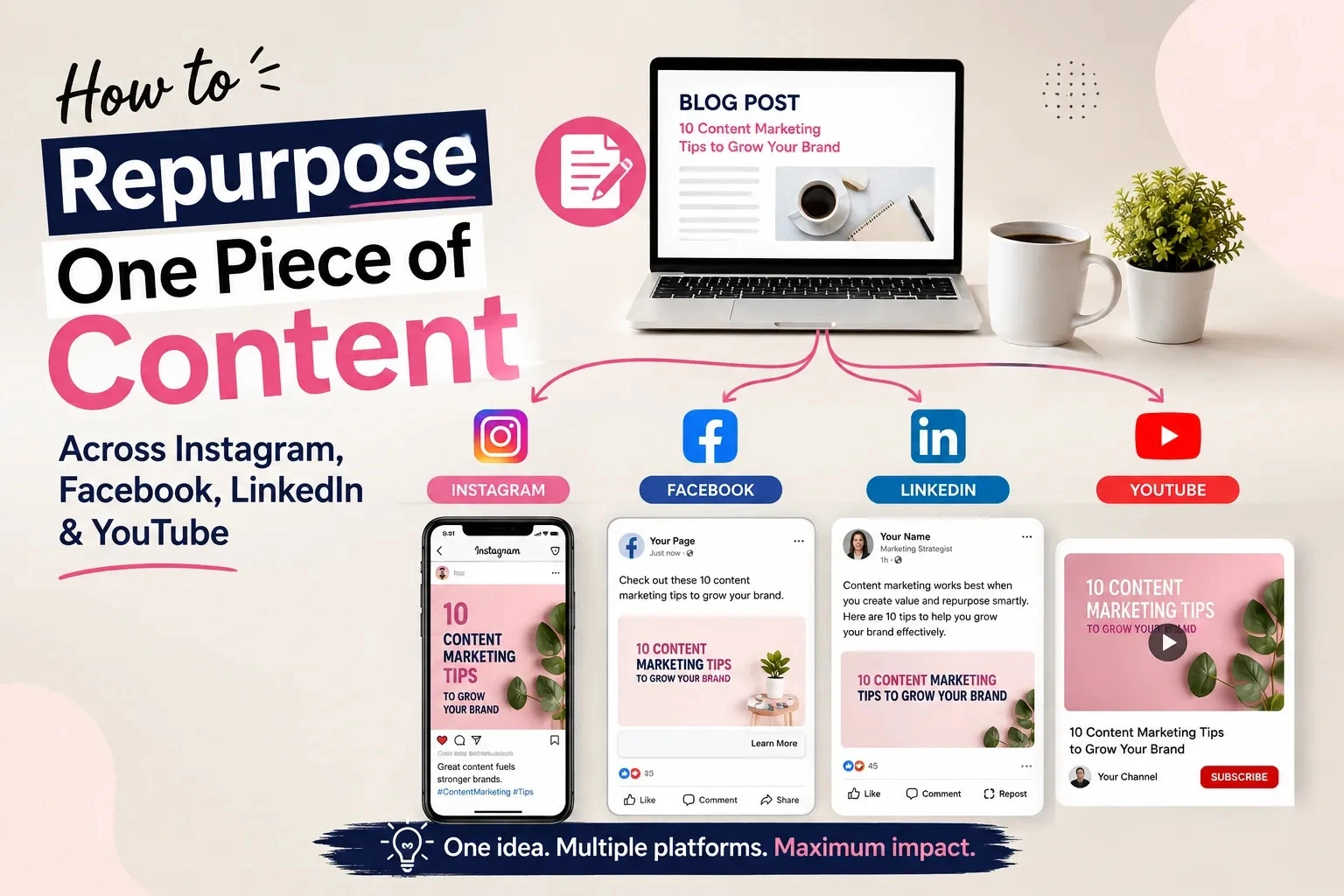
If you're creating content from scratch every single day, the problem isn't your creativity; it's your process. One well-built piece of content can realistically fuel a week of posts across Instagram, Facebook, LinkedIn, and YouTube. Done badly, repurposing just means the same caption pasted four times, and audiences notice. Done well, it means one idea, four platform-specific executions, and a calendar that stops running on panic.
This guide covers what to repurpose, how to adapt it per platform without diluting it, how to measure whether it worked, and how to turn it into a repeatable weekly workflow.
What Is Content Repurposing?
Content repurposing means taking one core idea and reshaping it into new, platform-appropriate formats instead of creating an entirely new idea every time. A single how-to video already contains a LinkedIn insight post, three Instagram Reels, and a Facebook discussion prompt; the ideas are already there, buried inside one format.It's different from cross-posting, which duplicates the same post everywhere. Repurposing adapts: the core message stays intact while the hook, length, tone, and format change to match how each audience actually consumes content. In practice, this is really about distribution: content marketing is the creation side, and repurposing is how that same creation work reaches more of the audience it was made for.
Why Repurpose Content Instead of Creating Every Post From Scratch?
-
Time: extracting five posts from one video takes a fraction of the time needed to research and produce five separate ideas.
-
Consistency: your strongest, most-researched ideas reach more people instead of dying after one post.
-
Reach across audiences: a LinkedIn professional and an Instagram scroller rarely overlap, so the same idea adapted for both multiplies reach, not just output.
The 1 → 4 → 12 Content Repurposing System
1 core idea → 4 platform adaptations → 12+ potential assets.One idea gets adapted for Instagram, Facebook, LinkedIn, and YouTube, and each adaptation can branch into multiple assets: a YouTube video, a Short, an Instagram Reel, a carousel, Stories, a Facebook post, a Facebook video, a LinkedIn post, a LinkedIn document carousel, an FAQ, a quote graphic, a newsletter angle.
Twelve is a ceiling, not a requirement; some weeks you'll pull three assets, other times a dozen. The principle matters more than the number: one core idea doesn't mean one identical post copied four times. It means one idea, executed differently on each platform.
What Content Should You Repurpose?
Not everything deserves a second life. Run the original through a quick scorecard first.Content Repurposing Scorecard
Rate each low, medium, or high: evergreen value (still true in six months?), audience relevance, business relevance, existing performance, subtopic richness, visual potential, and educational value.Skip content that's outdated, factually shaky, tied to an expired offer, or off-brand. One trap to avoid: a piece that underperformed isn't automatically bad. Weak results often trace to a poor hook, bad timing, or the wrong platform rather than a weak idea, so the fix is sometimes a new angle, not a burial.
How to Extract Multiple Ideas From One Core Asset
This is content atomization, breaking one asset into components:Core idea → main lesson → supporting points → a mistake → an example → a stat/fact → an FAQ → a checklist → an opinion → an action step
A 10-minute video on "how to price a freelance service" isn't one idea; it's a lesson on pricing psychology, a beginner mistake, a checklist for a first rate, an FAQ on raising prices with existing clients, and an opinion on flat-rate versus hourly. That's five posts inside one video, not one post copied five times. Treat this as a content inventory to pull from whenever you're short on ideas.
How to Repurpose Content for Instagram
Instagram rewards visual storytelling and fast hooks:-
Reel — built around the single strongest hook or mistake; the first two seconds carry the weight.
-
Carousel — a framework or checklist, one idea per slide.
-
Stories — behind-the-scenes, a poll, or a bridge back to the full piece.
How to Repurpose Content for Facebook
Facebook audiences respond to context and conversation, so posts can run longer:-
Educational post walking through the idea in a few short paragraphs.
-
Discussion post ending with a direct question to prompt comments.
-
Native video: a re-cut clip uploaded directly, not linked out.
-
Link posts back to the original piece, framed with a summary.
How to Repurpose Content for LinkedIn
LinkedIn reframes the same idea through a professional lens:-
Text insight post opening with a specific result, mistake, or observation, not a generic statement.
-
Document/carousel post turning a checklist into a swipeable PDF.
-
Thought-leadership framing connecting the tactical point to a broader business decision.
How to Repurpose Content for YouTube
YouTube is often both source and destination:-
Long-form video — the cornerstone piece other assets get extracted from.
-
Shorts — one tip, one mistake, one story, pulled from a longer video.
-
Tutorials — step-by-step content that doubles as a repurposing source, since each step is a potential Short or Reel.
One Content Idea Repurposed Across All Four Platforms
Core topic: "How Small Businesses Can Get More Customers From Instagram."YouTube (cornerstone): An 8–10 minute video on five tactics: bio optimisation, content pillars, DMs, collaborations, consistency. Audience: owners actively seeking a strategy. CTA: download a free content planning template.
YouTube Shorts: Three clips, each isolating one mistake: "Your Instagram bio is costing you customers." Hook: name the mistake in line one; purpose: drive curiosity toward the full video.
Instagram Reel: Built from the strongest single tactic (the DM strategy), reframed faster and punchier: "Stop posting and hoping. Do this instead." CTA: Save this for later.
Instagram carousel: The five tactics, one per slide, each with a one-line explanation a skimmable, saveable version of the same framework.
Instagram Stories: A poll "Which of these do you struggle with most?" to gather engagement before the carousel goes live.
Facebook post: The same five tactics written out, ending with "Which have you tried, and what worked?" Examples lean toward real shopfronts, since Facebook audiences skew slightly more local-business focused.
LinkedIn post: Reframed around the business outcome, not the tactics: "Most small businesses don't have an Instagram problem. They have a positioning problem." The tactics become supporting evidence. CTA: connect for more insights, not "watch my video."
What stayed the same: the five tactics and the core message. What changed: the hook, depth, tone, format, and CTA because each audience needed a different entry point into the same idea. For the broader strategy this example sits inside, see this step-by-step guide to building a social media marketing strategy for small businesses.
How to Repurpose a Blog Post Into Social Media Content
-
Identify the core argument: one sentence summarising the point.
-
Pull out the subheadings; each is a potential carousel slide or LinkedIn point.
-
Find the strongest stat, quote, or claim for a quote graphic or Reel hook.
-
Write a script, not a summary: open a Short or Reel with the hook and compress the argument into 30–45 seconds.
-
Turn the FAQ or objections section into standalone posts already framed as questions.
How to Repurpose a YouTube Video Into Multiple Social Posts
Watch (or read the transcript) looking for:-
A strong opening hook that stands alone
-
A complete thought that makes sense out of context
-
A specific tip or step useful on its own
-
A surprising fact or statistic
-
A mistake the video calls out or myth it corrects
-
A short, self-contained example or story
How to Repurpose Content Without Making It Feel Repetitive
Keep consistent: the central message, the facts, your brand positioning.Change per platform: the hook, format, angle, examples, tone, visual, and CTA.
A useful informal guideline is the 70/30 principle: roughly 70% of the core message stays the same across versions, while about 30% adapts to the platform and audience. This isn't a Google, Meta, LinkedIn, or YouTube algorithm rule; it's a practical editorial habit that keeps repurposed content recognisable without ever feeling copy-pasted.
How Often Should You Repurpose the Same Content?
There's no fixed number, but a reasonable default: actively repurpose cornerstone content for two to four weeks after publishing, then revisit in three to six months if it's still evergreen. Genuinely evergreen, high-performing pieces can be reworked with a fresh hook multiple times a year. Time-sensitive content shouldn't be repurposed past its relevance window at all.How to Build a Content Repurposing Calendar
A sample week built around one core idea:| Day | Platform | Content |
| Monday | YouTube | Long-form video (cornerstone) |
| Tuesday | Reel from the video's strongest tip | |
| Wednesday | Business-angle insight post | |
| Thursday | Educational post + discussion question | |
| Friday | Carousel breaking down the framework | |
| Saturday | YouTube | Short pulled from Monday's video |
| Sunday | Stories Q&A |
How to Measure Repurposed Content
Don't judge every platform by the same metric; track by objective:-
Awareness — reach, impressions, views
-
Engagement — comments, shares, saves, watch time
-
Traffic — link clicks, landing page visits, referral traffic
-
Leads — enquiries, form submissions, calls, sign-ups
-
Business outcomes — qualified leads, conversions, revenue where attributable
How to Decide What to Improve, Reuse or Repurpose Again
-
High reach, low engagement → the hook or topic didn't resonate; revisit before reusing.
-
High engagement, low clicks → tighten the CTA or offer; keep the content.
-
High watch time, low conversion → the content-to-offer bridge is weak.
-
Strong performance on one platform → adapt the idea for platforms it hasn't reached yet.
Can AI Help With Content Repurposing?
Yes, for the mechanical parts: transcribing video, summarising long content, spotting likely clip-worthy moments, drafting first-pass captions, generating variations to choose from, brainstorming hooks.What it shouldn't handle unsupervised: facts, statistics, brand positioning, customer claims, sensitive topics, and final strategic decisions. A drafted caption is a starting point, not a finished post; let AI handle first drafts and extraction, and let a person control what actually gets published. For a broader look at where AI fits into growth right now, see how AI is changing social media growth.
Content Repurposing for Small Businesses
-
Local service businesses (a salon in Chandigarh, a gym in Mohali) can turn one client transformation into a week of posts without filming anything new.
-
E-commerce businesses can turn one product demo into Reels, a use-case carousel, and a Facebook post answering a common question.
-
Agencies can turn one client result into a LinkedIn post, a Facebook proof point, and a carousel without disclosing confidential details.
-
Coaches and educators can turn one lesson into an FAQ series, a checklist carousel, and short teaching clips.
-
Consultants can turn one framework into a month of LinkedIn posts, one part at a time.
Common Content Repurposing Mistakes
-
Copying the same post everywhere — audiences notice; it reads as lazy.
-
Repurposing weak content — a thin idea doesn't strengthen by repeating.
-
Ignoring platform context — a LinkedIn-style post rarely works on Instagram.
-
Changing the core message too much — adapt delivery, not the point.
-
Chasing volume — more posts without purpose just creates noise.
-
Publishing everything the same day — reads as a dump, not a strategy.
-
Forgetting the CTA — every version needs a clear next step.
-
Ignoring performance data — repeating a weak format wastes effort.
-
Using AI output unedited — often sounds generic or slightly wrong.
-
Repurposing outdated information — stale advice hurts trust either way.
-
Measuring every platform the same way — hides what's actually working.
-
Skipping a clear audience — speaking to everyone resonates with no one.
The Complete Content Repurposing Workflow
-
Choose cornerstone content with the highest scorecard rating.
-
Evaluate whether it's worth repurposing: relevance, accuracy, evergreen value.
-
Extract the core ideas via the atomization framework.
-
Define the audience and objective for each version.
-
Select the platforms; not every idea needs all four.
-
Map formats: Reel, carousel, post, video, or Short.
-
Rewrite platform-specific hooks; never reuse the same opening line.
-
Adapt visuals to match each platform.
-
Create platform-specific CTAs.
-
Publish or schedule the sequence rather than dump at once.
-
Measure performance against the right metric.
-
Identify which angle or format performed best.
-
Improve and repurpose again, feeding what worked into the next cycle.
Content Repurposing Checklist
Before repurposing: valuable, accurate, relevant, evergreen, and holds multiple useful ideas.For each platform: new hook, correct format, platform-specific angle, appropriate visual, clear CTA, relevant audience.
After publishing: track performance, identify winners, improve weak assets, update evergreen content, reuse successful ideas.
Frequently Asked Questions
Is content repurposing the same as cross-posting?
No. Cross-posting duplicates the same post everywhere; repurposing keeps the core idea consistent while changing the hook, format, and depth per platform.How much content can one blog post or video really produce?
Realistically, four to twelve platform-specific assets, depending on how many subtopics it contains.Should beginners repurpose content or create new content first?
Beginners benefit from repurposing early; it forces you to study what already resonated instead of guessing every time you post.Does repurposed content perform worse than original content?
Not inherently. Performance depends on how well each version is adapted, not on whether the idea has been used before.How do I know if I'm repurposing too much or too little?
If your audience says everything feels repetitive, you're changing too little between versions. If you're building everything from scratch weekly, you're repurposing too little.Final Takeaway
Content repurposing isn't about squeezing more posts out of less work; it's about giving your best ideas the platform-specific treatment they need to land with different audiences. Start with one strong cornerstone piece, run it through the 1 → 4 → 12 system, adapt honestly instead of copying, and measure by the right metric for each platform. Do that consistently and content creation stops being a weekly scramble and becomes a system you repeat indefinitely. If you're building this as part of a broader skill set, Digital Study School's social media marketing course covers this alongside the rest of the strategy and execution skills that make repurposing work.