WhatsApp Business Guide for Salons: Manage Bookings & Reminders
Introduction
If you run a salon, you already know the daily struggle. The phone rings while you are in the middle of a haircut. A customer messages on Instagram asking for the price of a facial, and by the time you reply, she has already booked somewhere else. Someone forgets their appointment and simply doesn't show up. And your regular customers, the ones who used to visit every month, slowly stop coming back because nobody followed up with them.This is where a proper WhatsApp Business guide for salons becomes useful. Most salons already use WhatsApp in some way, but very few use it as an actual system. There is a big difference between just replying to messages and having a simple, organised process that handles enquiries, bookings, reminders, and repeat visits without extra effort.
In this guide, we will walk through exactly how salons, beauty studios, spas, and makeup artists can turn WhatsApp Business into a simple booking and follow-up system. No technical jargon, no complicated software talk. Just practical steps you can start using today.
Why Salons Need a WhatsApp Business System
Ask any salon owner what their biggest daily headache is, and communication problems usually top the list. Here are the issues that quietly cost salons money every single week:-
Messages get missed because they come in while staff are busy with clients.
-
Replies are slow, and a slow reply often means a lost booking.
-
The same questions repeat all day: "What is the price of a haircut?" "Are you open today?", "Do you do bridal makeup?"
-
Appointment timings are unclear, leading to customers arriving at the wrong time or on the wrong day.
-
Customers simply forget their appointment because nobody reminded them.
-
Old customers fade away because there is no follow-up after their first or second visit.
-
Offers go out randomly, with no real plan behind them.
-
There is no tracking of who is a new enquiry, who is a repeat customer, and who needs a follow-up call.
WhatsApp Business App vs WhatsApp Business Platform for Salons
Before setting anything up, it helps to understand that there are two versions of WhatsApp Business. Most salons only need one of them.WhatsApp Business App
This is the free app you download directly on your phone, just like regular WhatsApp. It is perfect for small salons, independent makeup artists, hair stylists, nail artists, and local beauty studios that are run by one or two people.It includes useful features such as:
-
A business profile with your salon details
-
A catalogue to show your services
-
Quick replies for common questions
-
Labels to organise customers
-
A greeting message for new chats
-
An away message for when you are closed
-
Broadcast lists to message multiple customers at once
-
WhatsApp Status to share updates and photos
WhatsApp Business Platform (API)
This is a more advanced, paid setup that suits bigger salons, salon chains, spas, and beauty clinics with multiple branches or a large team. It allows automation, multiple staff logins, connection with CRM tools, and chatbot-style replies.You do not need this when you are starting out. Begin with the free app, build your habits and templates, and only think about the API version once your salon has outgrown what the basic app can handle.
Simple WhatsApp Booking Workflow for Salons
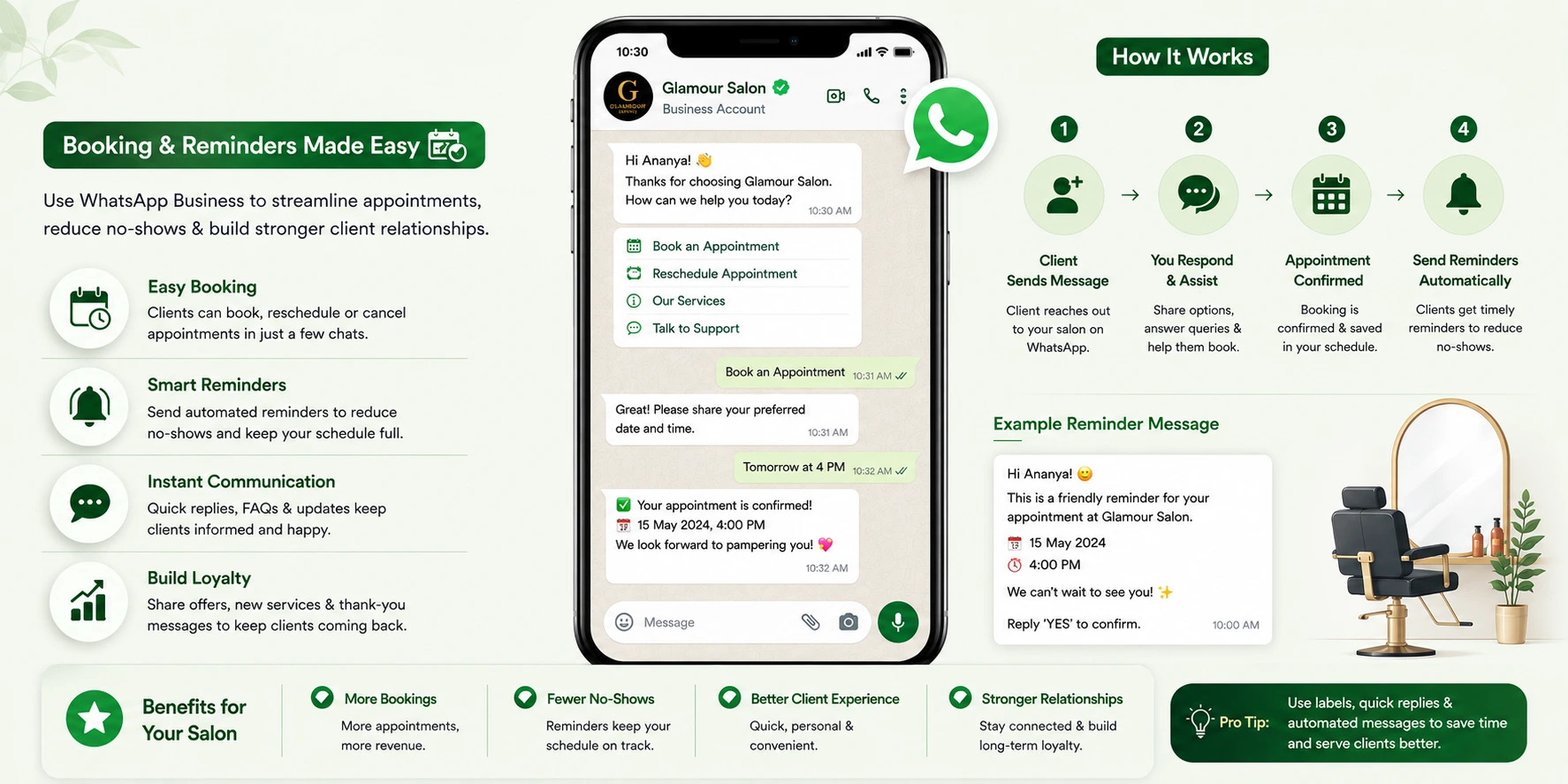
This is the heart of the whole system. Once you follow this workflow consistently, missed bookings and confused customers become rare.Step 1: Customer asks about a service. A customer messages asking about a haircut, facial, or bridal package.
Step 2: Salon replies with service details and price range. Give a clear answer, not a vague one. Mention the starting price and what it includes.
Step 3: Salon asks for preferred date and time. A simple question like "Which day and time works for you?" moves the conversation forward.
Step 4: Customer chooses a slot. They reply with their preferred timing.
Step 5: Salon confirms appointment. Send a clear confirmation with the date, time, and service name.
Step 6: Salon sends location and preparation note. Share the Google Maps pin and any instructions, such as arriving five minutes early.
Step 7: Salon sends a reminder 24 hours before. This alone reduces a large chunk of missed appointments.
Step 8: Salon sends a same-day reminder. A short message a few hours before the appointment works well.
Step 9: Customer visits the salon. The actual service happens.
Step 10: Salon sends a thank-you message. A warm note after the visit builds goodwill.
Step 11: Salon asks for a review. Right after a good experience is the best time to ask.
Step 12: Salon sends a repeat booking reminder after a few weeks. This brings the customer back for their next visit.
Once you write this workflow down and follow it for every customer, WhatsApp stops being random chatting and becomes an actual booking system.
How Salons Can Manage Appointments on WhatsApp Business
WhatsApp is well suited to handle the entire appointment process, from the first enquiry to the final confirmation. Here is how it works for different services:-
Hair spa enquiry: Share the price range, duration, and available time slots for the day.
-
Bridal makeup enquiry: Ask for the wedding date first, then share packages and trial details.
-
Facial enquiry: Mention skin type options and recommend a suitable facial based on the customer's needs.
-
Hair colour enquiry: Ask if they want global colour or highlights, then share pricing accordingly.
-
Nail art enquiry: Share your catalogue with nail designs and current pricing.
-
Waxing enquiry: Confirm the specific areas and share the combined price for full-body or partial waxing.
How to Use WhatsApp Labels for Salon Booking Management
Labels are one of the most underused features in WhatsApp Business, yet they are extremely useful for salons. Think of labels as sticky notes that help you instantly see where each customer stands.Here are labels that work well for a salon:
-
New enquiry – for first-time messages
-
Price shared – customer has been told the pricing
-
Appointment confirmed – booking is locked in
-
Reminder sent – reminder has already gone out
-
Payment pending – service done, payment not yet received
-
Visited – appointment completed
-
Follow-up needed – customer needs a nudge
-
Bridal lead – potential bridal client
-
Repeat customer – has visited more than once
-
VIP customer – high-value, regular client
-
Cancelled appointment – booking did not happen
-
Birthday offer – customer to receive a birthday message
How to Send Salon Appointment Reminders on WhatsApp
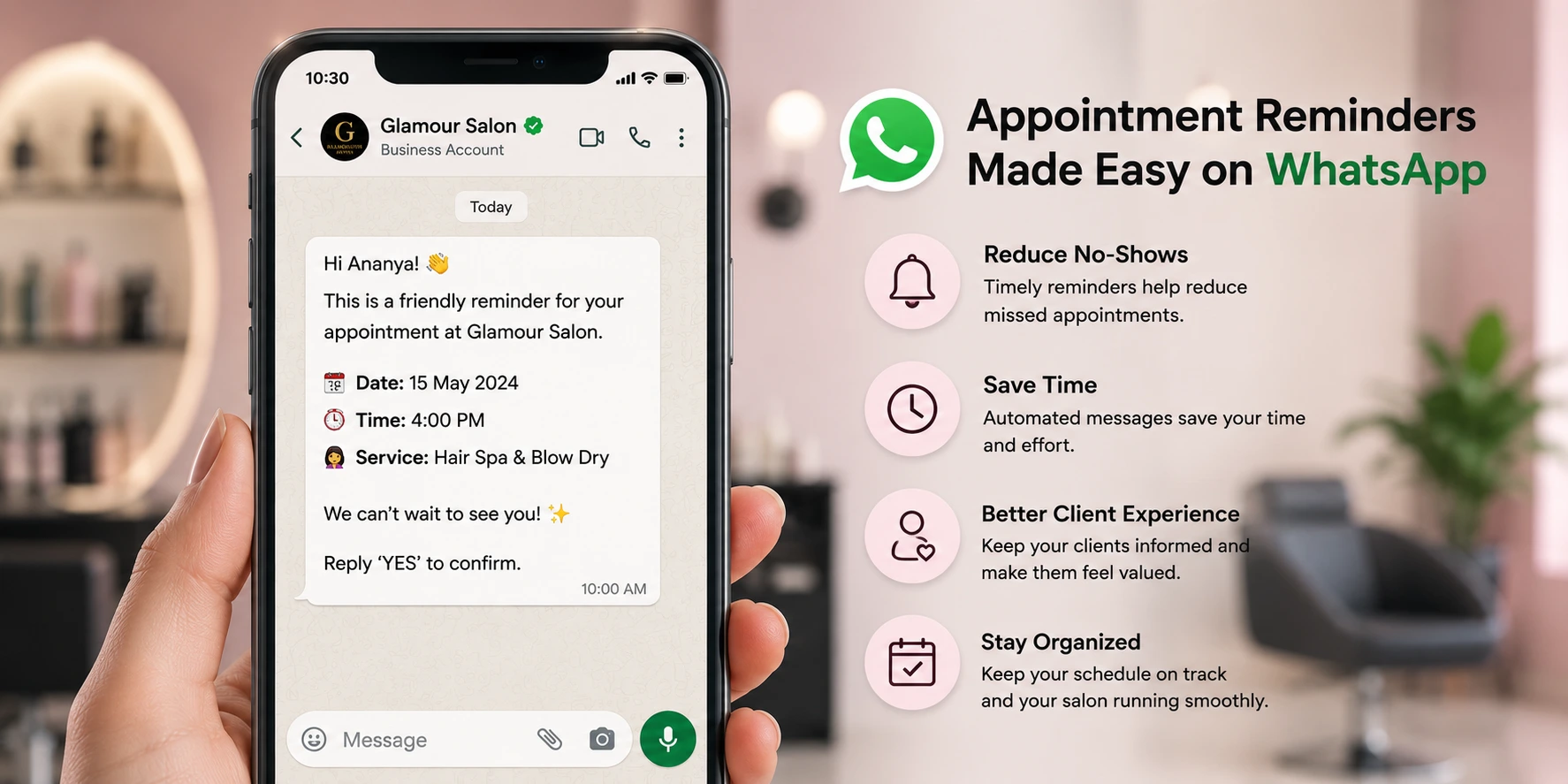
Missed appointments hurt salons in two ways: lost income for that slot and wasted staff time. WhatsApp appointment reminders for salons are one of the simplest fixes available.24-hour reminder example: "Hi Priya, just a reminder that your hair spa appointment is booked for tomorrow at 4 PM. See you then!"
Same-day reminder example: "Hi Priya, looking forward to seeing you today at 4 PM for your hair spa. Let us know if you're running late."
Reschedule message example: "Hi Priya, if 4 PM doesn't work for you anymore, just let us know a better time and we'll adjust your slot."
No-show follow-up message example: "Hi Priya, we missed you today. Would you like to book another slot this week?"
Confirmation message example: "Your appointment for hair spa is confirmed for Saturday, 4 PM. We'll send you a reminder a day before."
Sending even two of these five message types consistently makes a noticeable difference in how many customers actually show up.
How WhatsApp Business Helps Salons Get Repeat Bookings
Salon services are naturally repeat-based. Hair colour needs touch-ups, facials work best when done regularly, and nails need refills. Yet many salons only think about the first visit and forget to bring the customer back.Here is how WhatsApp helps with that:
-
Thank-you messages after service show the customer you value their visit.
-
Aftercare tips (for example, how to maintain hair colour) keep the conversation useful, not just promotional.
-
Rebooking reminders sent a few weeks later bring customers back before they even think of going elsewhere.
-
Birthday offers are a simple, personal touch that customers remember.
-
Festival offers tied to occasions like Diwali or New Year create urgency.
-
Hair colour follow-up messages sent around the 4 to 6 week mark remind customers it's time for a touch-up.
-
Facial follow-up reminders work well on a monthly cycle.
-
Nail refill reminders sent every 2 to 3 weeks match how nails typically grow out.
-
Bridal trial follow-up messages help convert a trial booking into the final bridal package.
-
Membership or package reminders notify customers when they have sessions left to use.
How to Set Up a WhatsApp Business Profile for a Salon
Your WhatsApp Business profile is often the first impression a new customer gets, so it's worth setting up properly. Include:-
Salon name
-
Logo or a clear profile photo
-
Business category (Beauty, Cosmetics & Personal Care)
-
A short salon description
-
Full address
-
Opening hours
-
Website link, if you have one
-
Instagram link
-
A short list of your main services
-
A simple booking instruction
Keep it short, clear, and friendly. Avoid long paragraphs that customers won't read.
How to Use WhatsApp Catalogue as a Salon Service Menu
The WhatsApp catalogue feature works well as a simple digital service menu. Instead of typing out prices every time someone asks, you can just share the catalogue.Services worth adding include haircut, hair spa, hair colour, keratin treatment, bridal makeup, party makeup, facial, waxing, nail art, manicure, pedicure, skin consultation, and beauty packages.
For each catalogue item, include:
-
Service name
-
A short, clear description
-
Starting price
-
Approximate duration
-
A service photo
-
A short booking note
This kind of clear listing saves time for both you and the customer, and it looks far more professional than typing prices in plain text every time.
Quick Replies Every Salon Should Create
Quick replies let you answer common questions in seconds instead of typing the same thing repeatedly. Here are a few worth setting up:-
Price request: "Hi! Here's our starting price list. Let us know which service you're interested in and we'll share more details."
-
Appointment booking: "Sure! Please share your preferred date and time, and we'll confirm your slot."
-
Location: "Here's our salon location: [map link]. We're open from 10 AM to 8 PM."
-
Salon timing: "We're open every day from 10 AM to 8 PM, except Tuesdays."
-
Bridal package: "We'd love to help with your bridal look. Could you share your wedding date so we can check our availability?"
-
Hair colour consultation: "For hair colour, we usually recommend a quick consultation first. Would you like to visit for a free patch test?"
-
Facial enquiry: "We offer facials suited to different skin types. Would you like us to suggest one based on your skin concern?"
-
Current offers: "Here's what's currently running: [offer details]. Let us know if you'd like to book."
-
Reschedule request: "No problem! Please share a new date and time that works better for you."
20 Ready-to-Use WhatsApp Message Templates for Salons
Copy, personalise, and use these directly.-
New enquiry: "Hi! Thanks for reaching out to [Salon Name]. How can we help you today?"
-
Price request: "Here are our starting prices: Haircut ₹300, Facial ₹800, Hair Spa ₹1000. Let us know which one you'd like to book."
-
Appointment confirmation: "Your appointment for [service] is confirmed on [date] at [time]. See you then!"
-
24-hour reminder: "Reminder: Your appointment for [service] is tomorrow at [time]."
-
Same-day reminder: "Just a quick reminder, your appointment today is at [time]. See you soon!"
-
Reschedule message: "If today's timing doesn't suit you, let us know a better slot and we'll adjust it."
-
No-show follow-up: "We missed you today! Would you like to rebook for another day this week?"
-
Bridal makeup enquiry: "Congratulations! Could you share your wedding date so we can check our bridal package availability?"
-
Hair colour consultation: "For the best results, we recommend a quick in-salon consultation before your hair colour appointment. Would that work for you?"
-
Hair spa rebooking: "It's usually time for your next hair spa session. Would you like to book a slot this week?"
-
Facial aftercare: "Thanks for visiting today! Avoid sun exposure for the next 24 hours and drink plenty of water."
-
Nail refill reminder: "Your nails are usually due for a refill around this time. Want us to book you a slot?"
-
Birthday offer: "Happy Birthday from all of us at [Salon Name]! Enjoy 15% off any service this month."
-
Festival offer: "This festive season, enjoy special offers on facials and hair treatments. Message us to book your slot."
-
Review request: "We hope you loved your visit today! If you have a moment, a quick review would mean a lot to us."
-
Thank-you message: "Thank you for visiting [Salon Name] today. We loved having you!"
-
Empty slot update: "We have a few open slots today between [time] and [time]. Want to grab one?"
-
Repeat booking reminder: "It's been a while since your last visit. Would you like to book your next appointment?"
-
Membership package message: "You have 2 sessions remaining in your package. Would you like to schedule your next one?"
-
Win-back message for old customers: "We miss seeing you at [Salon Name]! Here's 10% off your next visit if you book this month."
How Salons Can Use WhatsApp Broadcasts Without Annoying Customers
Broadcasts let you send one message to many customers at once, but they need to be used carefully. Good use cases include festival offers, bridal season packages, new service launches, birthday discounts, empty slot updates, weekend offers, hair care packages, and facial packages.A few rules to keep broadcasts effective instead of irritating:
-
Do not send messages too often. Once or twice a week is usually enough.
-
Only send genuinely useful offers.
-
Segment your customers where possible, so bridal offers go to bridal leads and not to everyone.
-
Avoid sending the same generic offer to your entire list regardless of their interest.
-
Keep messages short and to the point.
-
Always give the customer a clear way to respond, such as "Reply YES to book."
How Salons Can Use WhatsApp Status to Get More Bookings
WhatsApp Status is free, visible to your saved contacts, and often overlooked by salons. Here are simple status ideas that work well:-
Before-and-after photos of transformations
-
New offers and discounts
-
Today's empty slots
-
Screenshots of customer reviews
-
Hair colour results
-
Bridal makeup looks
-
Nail art designs
-
Product recommendations
-
Salon hygiene updates
-
A quick staff introduction
-
Festival packages
-
Last-minute booking availability
How to Get More Salon Bookings from Instagram and Facebook to WhatsApp
Many salons post great content on Instagram and Facebook but never guide followers toward an actual booking. WhatsApp is the missing link. Simple CTAs that work well include:-
"Message us on WhatsApp to book"
-
"Click the WhatsApp link in our bio"
-
"Send your hair reference photo on WhatsApp"
-
"Book your facial appointment on WhatsApp"
-
"Ask for our bridal package on WhatsApp"
-
"Message us for today's available slots"
Local Example: How Salons in Chandigarh, Mohali and Kharar Can Use WhatsApp
-
A salon in Mohali can reduce missed appointments simply by adding a 24-hour and same-day WhatsApp reminder to its daily routine.
-
A makeup artist in Chandigarh handling multiple bridal enquiries during wedding season can use labels like "Bridal lead" and "Trial booked" to stay organised without losing track of any client.
-
A salon in Kharar looking to attract more local customers can combine Instagram Reels with a WhatsApp booking link in its bio, turning views into actual appointments.
-
A nail studio anywhere in the Tricity area can post daily WhatsApp Status updates showing new nail designs alongside today's open slots.
Common WhatsApp Mistakes Salons Should Avoid
-
Using a personal WhatsApp number instead of WhatsApp Business
-
Mixing personal chats and business chats in the same account
-
Replying too late to enquiries
-
Sending only offers and never anything useful
-
Not using labels to organise customers
-
Not properly confirming appointment date and time
-
Never asking customers for reviews
-
Sending too many broadcasts in a short time
-
Not saving customer preferences, such as their preferred stylist or service
-
Not adding the WhatsApp link to Instagram, Facebook, the website, and Google Business Profile
Simple 7-Day WhatsApp Business Setup Plan for Salons
Day 1: Create your WhatsApp Business profile with your salon name, logo, description, address, and hours.Day 2: Add your service catalogue with prices, durations, and photos.
Day 3: Create quick replies for common questions like pricing, location, and timing.
Day 4: Set up labels such as New enquiry, Confirmed, Visited, and Follow-up needed.
Day 5: Prepare your appointment reminder messages, including 24-hour and same-day reminders.
Day 6: Add your WhatsApp link to Instagram, Facebook, Google Business Profile, and your website.
Day 7: Start your follow-up system by messaging old customers who haven't visited recently.
Spread over a week, none of these steps takes more than 20 to 30 minutes a day, but together they build a real system.
Conclusion
WhatsApp Business doesn't need to be complicated to be effective. With a clear profile, a simple catalogue, a few labels, some ready-made reminder templates, and a basic follow-up habit, salons can manage bookings more smoothly, reduce missed appointments, and bring customers back again and again. None of this guarantees a fixed result, but it does give salon owners a practical, low-cost system that's far easier to manage than juggling calls, DMs, and sticky notes.If you are interested and want to learn in depth, our Digital Marketing Course in Mohali offer practical training in social media marketing, SEO, paid ads, automation, and email marketing, all with 30+ AI tools.
FAQs
1. What is the best WhatsApp Business guide for salons?
The best guide is one that focuses on real salon workflows, not just app features. This means covering appointment booking, reminders, labels, catalogues, and repeat customer follow-up, exactly as explained in this article.2. Is WhatsApp Business useful for salons?
Yes. It helps salons manage enquiries, confirm appointments, send reminders, share pricing through a catalogue, and follow up with customers for repeat bookings, all from one place.3. Can salons manage appointments on WhatsApp?
Yes. Salons can use WhatsApp to share service details, confirm appointment date and time, send location, and organise all of this using labels so nothing gets missed.4. How can salons send appointment reminders on WhatsApp?
Salons can send a 24-hour reminder, a same-day reminder, and a follow-up message if a customer misses their slot. These can be sent manually or set up as quick replies for faster sending.5. Is WhatsApp Business free for salons?
The WhatsApp Business App is free to download and use. The more advanced WhatsApp Business Platform (API), typically used by larger salon chains, involves additional costs.6. What is the difference between WhatsApp Business App and API for salons?
The app is free and suits small to medium salons handling things manually. The API is a paid, more advanced option suited to larger salons or chains that need automation and multiple staff logins.7. How can salons get repeat customers using WhatsApp?
By sending thank-you messages, aftercare tips, rebooking reminders, birthday and festival offers, and timely follow-ups for services like hair colour, facials, and nails that need regular visits.8. Can salons run Facebook and Instagram ads that open WhatsApp?
Yes. Click-to-WhatsApp ads let salons run ads on Facebook and Instagram that open a WhatsApp chat directly when clicked, making it easy for potential customers to start a conversation and book.